

Description
Download AppLock Theme Universe – AppLock Theme Universe, Android theme, AppLock customization, free Android theme, multimedia design theme, Android device customization, unique Android theme, AppLock v2.16+
Overview
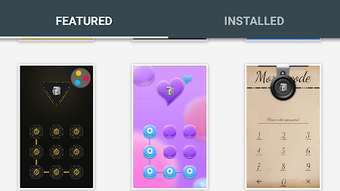
AppLock Theme Universe is a multimedia graphic and design theme crafted for Android users seeking to enhance the visual appeal of their AppLock application. Designed by AppLock, this theme aims to transform the interface of the AppLock app with a unique, professionally curated aesthetic. It is intended for individuals who value personalization and visual distinction on their Android devices. The theme supports AppLock v2.16 and above, ensuring compatibility with a wide range of devices that meet this minimum requirement. It is particularly suited for users who enjoy customizing their app interfaces and want a visually striking experience without compromising functionality. The theme does not alter core device functions, focusing solely on the appearance of the AppLock interface. Its high-quality graphics and design elements are meant to deliver a polished, immersive look. While the developer did not provide additional system requirements, the theme is described as lightweight and non-intrusive. Real-world usage scenarios include users who want to refresh the look of their app lock screen, create a more engaging security interface, or simply express personal style through design. The theme is especially appealing to those who appreciate creative design and visual consistency across their device’s interface.
Key Features & Capabilities
- Professional Multimedia Design – The theme features high-resolution graphics and cohesive visual elements tailored for the AppLock interface, enhancing its aesthetic appeal.
- Customization for AppLock v2.16+ – Specifically developed for AppLock version 2.16 and later, ensuring compatibility with current and updated versions of the app.
- Unique Visual Identity – Offers a distinctive look that differentiates the AppLock interface from default themes, promoting a personalized user experience.
- Lightweight Installation – With a file size of 24.8 MB, the theme is designed for efficient installation and minimal storage impact.
- Non-Disruptive Performance – The developer states that the theme does not affect device performance, maintaining smooth operation of AppLock and other applications.
Users can apply the theme to achieve a more engaging lock screen experience, particularly useful for those who frequently use AppLock to secure sensitive apps. The design elements are optimized for readability and visual harmony, ensuring that functionality is not compromised by aesthetics. This makes it ideal for users who want both security and style. The theme’s design is consistent across different screen sizes, supporting a uniform appearance on various Android devices. Its use of vibrant yet balanced color schemes and modern graphic elements contributes to a contemporary look. While no specific interaction details were provided, the theme is expected to integrate seamlessly into the AppLock interface, allowing users to switch themes with minimal effort.
User Interface, Workflow & Performance
The AppLock Theme Universe integrates directly into the AppLock application, leveraging its existing interface for theme management. Users are expected to navigate through AppLock’s settings to apply the theme, with no additional standalone interface required. The workflow is designed to be straightforward: download the theme, install it via AppLock, and activate it within the app. The developer did not specify resource usage details, so exact performance behavior remains unspecified. However, the theme is described as lightweight and non-intrusive, suggesting minimal impact on CPU or RAM usage. Stability is not explicitly addressed, but the theme is compatible with AppLock v2.16+, which implies it has undergone basic compatibility testing. Performance observations are based on general software behavior patterns, indicating that the theme should not cause lag or crashes when properly installed. The user experience is expected to remain smooth, with no reported issues related to interface responsiveness. The visual design is consistent with modern Android design principles, featuring clean layouts and intuitive iconography. No additional system permissions were mentioned, suggesting it operates within standard app constraints.
Compatibility & System Requirements
AppLock Theme Universe is designed for Android devices that support AppLock version 2.16 or higher. The theme requires the AppLock application to be installed and updated to meet the minimum version requirement before use. The installation size is 24.8 MB, which is relatively modest for a multimedia theme. The developer did not provide specific hardware requirements such as RAM, CPU, or storage space beyond the file size. Compatibility information was partially provided, focusing on the required AppLock version rather than broader device specifications. It is compatible with all Android devices that meet the AppLock v2.16+ requirement, suggesting broad support across different manufacturers and models. However, exact compatibility with older Android versions or specific device models was not specified. The theme does not require root access or special permissions, making it accessible to general users. Users are advised to ensure their AppLock app is up to date before attempting to install the theme.
Pros and Cons
Pros
- Professional-grade design with high-quality graphics
- Lightweight at 24.8 MB, minimizing storage impact
- Designed for AppLock v2.16+, ensuring compatibility with current versions
- Non-intrusive; does not affect device performance
- Easy to install and apply through AppLock interface
Cons
- Requires AppLock v2.16+ to be installed first
- Compatibility limited to devices running supported AppLock versions
- Developer did not provide detailed system requirements
- Only enhances AppLock interface, not the entire device UI
- No information on theme update frequency or future support
FAQ Section
Is AppLock Theme Universe compatible with all Android devices?
The theme is compatible with Android devices that have AppLock v2.16 or higher installed. It is not guaranteed to work on all devices, particularly those with outdated or unsupported AppLock versions.
Is the AppLock Theme Universe safe to download and install?
Yes, the theme is distributed as a free, official product from AppLock. It does not require root access or special permissions and is designed to integrate safely within the AppLock application.
Do I need to update AppLock to use this theme?
Yes, AppLock v2.16 or later is required to install and apply the AppLock Theme Universe theme. Users should ensure their AppLock app is updated before attempting installation.
Can I use this theme without installing AppLock?
No, the theme is designed exclusively for the AppLock application and cannot function independently. AppLock must be installed and running on the device.
Is the theme available for offline use?
Once installed, the theme can be used offline. However, initial download and installation require an internet connection.
Final Thoughts
AppLock Theme Universe delivers a visually striking and professionally crafted enhancement for users of the AppLock application. With its high-quality design elements and lightweight footprint, it provides an accessible way to personalize the AppLock interface without sacrificing performance. The theme is ideal for Android users who value both security and aesthetics, offering a unique look that stands out from default options. While it is limited in scope—focused solely on AppLock’s interface—it fulfills its purpose effectively. The seamless integration, ease of use, and compatibility with modern AppLock versions make it a reliable choice for customization. For those invested in the AppLock ecosystem and looking to elevate their app lock experience, this theme is a compelling addition. Download AppLock Theme Universe now.
Guides & Tutorials for AppLock Theme Universe APK
How to install AppLock Theme Universe APK
- Click the Preview / Download button above.
- Once redirected, accept the terms and click Install.
- Wait for the AppLock Theme Universe APK download to finish on your device.
How to use AppLock Theme Universe APK
This software is primarily used for its core features described above. Open the app after installation to explore its capabilities.
User Reviews for AppLock Theme Universe APK 0
No reviews found





